
How to Deposit in DK999 Game
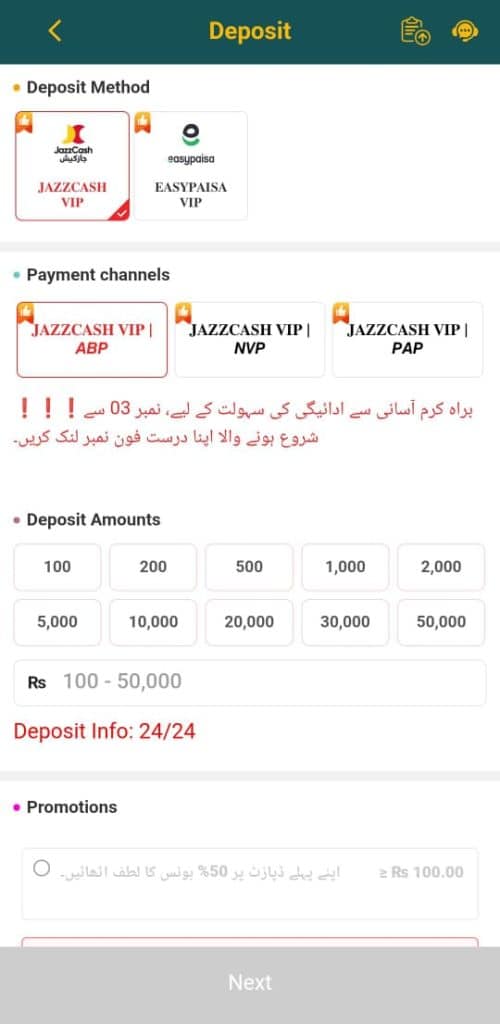
Open Deposit Section
- Go to the “Deposit” tab in your DK999 app.
Choose Deposit Method
You have two options:
- JazzCash VIP
- Easypaisa VIP
(Select whichever wallet you use.)
Choose Payment Channel
You’ll see three JazzCash VIP channels:
- JAZZCASH VIP | ABP
- JAZZCASH VIP | NVP
- JAZZCASH VIP | PAP
Choose any active one (ABP is usually the default and active).
Note:
The red Urdu text says:
براہ کرم آسانی سے ادائیگی کی سہولت کے لیے، نمبر 03 سے شروع ہونے والا اپنا درست فون نمبر لنک کریں۔
(Please link your correct phone number that starts with 03 for smooth payments.)
So, make sure your DK999 Game account phone number starts with “03” (e.g., 0300xxxxxxx).
Select Deposit Amount
Choose from the preset options:
- Rs 100, Rs 200, Rs 500, Rs 1000, Rs 2000, Rs 5000, Rs 10,000, Rs 20,000, Rs 30,000, Rs 50,000
(Deposit limit: Rs 100 – Rs 50,000)
Click “Next”
It will show you the JazzCash or Easypaisa account number to send payment to.
Open your wallet app (JazzCash/Easypaisa), send the exact amount, and then return to DK999 Game to confirm your payment.
Wait for Confirmation
After confirmation, your balance will appear in your Main Wallet.
How to Withdraw in DK999 Game
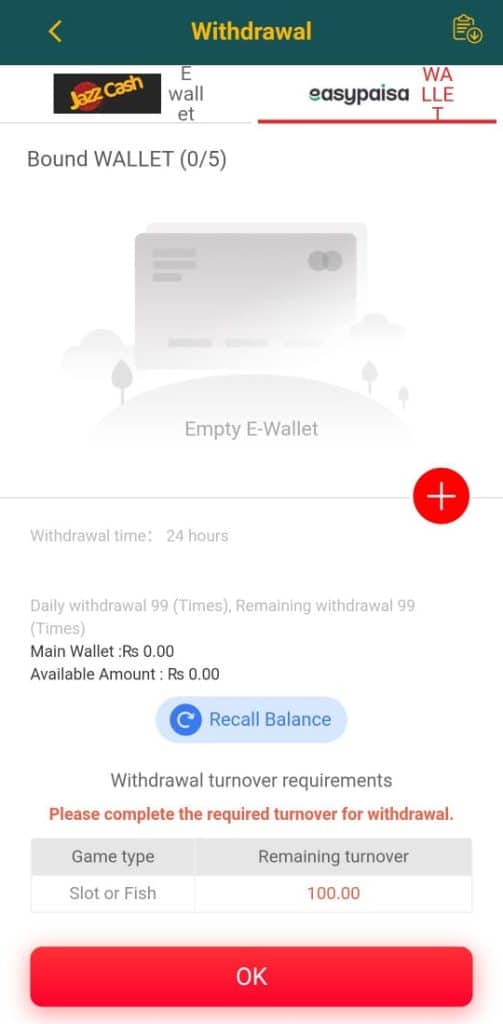
Open Withdrawal Section
Tap the “Withdrawal” tab.
Bind Your Wallet
You can link up to 5 wallets (JazzCash or Easypaisa).
- Tap the “+” (red button)
- Enter your wallet details (number and name must match your DK999 Game account).
- Save it.
Check Your Balance
- Main Wallet: Shows your available funds.
- Available Amount: Total withdrawable balance.
If it shows Rs 0.00, you need to win or transfer funds first.
Complete Turnover Requirement
At the bottom, it says:
“Withdrawal turnover requirements: Please complete the required turnover for withdrawal.”
That means you must wager or play games (Slot or Fish) equal to the shown turnover (e.g., Rs 100) before withdrawal is allowed.
Once your remaining turnover shows 0.00, you can withdraw.
Recall Balance (Optional)
If your game balance is not showing in the main wallet, click “Recall Balance” it pulls your balance back to the main wallet.
Withdraw
- Enter amount to withdraw.
- Choose your bound wallet.
- Tap “OK” to process.
Withdrawal time: Within 24 hours
(Usually completes in 10–30 minutes depending on wallet traffic.)
Summary:
| Action | Method | Key Notes |
|---|---|---|
| Deposit | JazzCash / Easypaisa | Ensure correct phone number, 03-starting, Rs 100–50,000 |
| Withdrawal | JazzCash / Easypaisa | Must complete turnover before withdrawing |
| Processing Time | 24 hours max | Normally faster |
| Balance Sync | Use “Recall Balance” | To bring funds from games to wallet |